

Recover Lost Crypto on Coinbase: Step-by-Step Guide

- Description
- Curriculum
- FAQ
- Reviews
How to Recover Lost Crypto from Coinbase Using the Asset Recovery Tool
Coinbase provides a self-service Asset Recovery tool, available exclusively through a web browser, to assist in recovering tokens mistakenly sent to a Coinbase address. This guide will walk you through the step-by-step process of using this tool effectively.
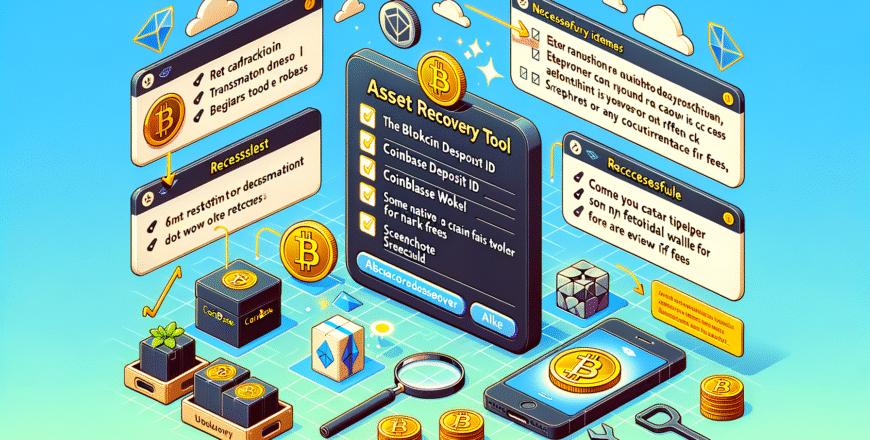
Quick Checklist: What to Gather Before You Start
- Transaction ID (TXID): The blockchain transaction ID for the failed transfer.
- Coinbase Deposit Address: The specific Coinbase address to which the tokens were sent.
- Self-Custodial Wallet: A wallet you control, such as Coinbase Wallet or MetaMask, for proving ownership.
- ETH or Native Chain Gas Token: Ensure you have some ETH in your Coinbase Wallet or account to cover network fees.
- Documentation: Keep screenshots, the TXID, and any relevant correspondence handy in case you need to escalate.
Step-by-Step Recovery Process
1. Confirm Eligibility for Recovery
If tokens were sent to a Coinbase deposit address but the token is unsupported on Coinbase, the Asset Recovery tool might assist. However, if the tokens were sent to an incorrect address or to someone else’s address, those transactions are irreversible. In such cases, contacting the recipient directly, if possible, is your only recourse.
2. Access the Asset Recovery Tool
Open the Asset Recovery page in a web browser (not via mobile app) by going to Coinbase’s official Recover Unsupported Crypto / Asset Recovery page. Ensure you’re on the correct Coinbase help page to avoid phishing sites.
3. Initiate the Recovery Workflow
Click Continue on the Asset Recovery page to start the process. Follow the prompts to select the transaction network and enter the TXID along with the Coinbase address where the tokens were sent. Coinbase will proceed to locate the transaction on-chain.
4. Transaction Found and Asset Eligibility
If Coinbase successfully locates the on-chain transaction and deems the asset eligible, you’ll be prompted to connect a self-custodial wallet. This wallet (such as Coinbase Wallet or MetaMask) will be where the recovered tokens are sent. Be prepared to pay any applicable network fees and a 5% recovery fee on amounts over $100.
5. Finalizing the Recovery
Once you connect your wallet and approve the transaction, the recovery process will be initiated. Monitor your wallet for the arrival of the recovered tokens. Ensure your wallet has sufficient balance for any fee deductions, if applicable.
Conclusion
Using Coinbase’s Asset Recovery tool is a useful approach to retrieving unsupported tokens sent to a Coinbase address. By following these detailed steps and ensuring all necessary information is at hand, you can increase the likelihood of a successful recovery.
-
1
 Overview of Coinbase Asset Recovery ToolIn this lesson, "Unlocking Lost Assets: A Guide to the Coinbase Asset Recovery Tool," students will learn how to efficiently navigate and utilize the Coinbase Asset Recovery Tool to recover and manage misplaced or lost digital assets. By the end of the session, participants will be equipped with the knowledge to ensure the security and retrieval of their cryptocurrency investments, enhancing their confidence and competence in digital asset management.
 -
2
Understanding the Recovery ProcessIn "Navigating Through Recovery: A Comprehensive Guide," students will explore the essential stages of the recovery process, gaining insights into both physical and emotional healing. This lesson will equip learners with practical strategies to manage setbacks and build resilience, ultimately empowering them to confidently navigate their own or others' recovery journeys.
-
3
Quick Checklist for Asset RecoveryIn this lesson, "Essential Steps for Effective Asset Recovery: A Quick Checklist," students will learn the critical steps to efficiently recover assets, ensuring a streamlined and successful process. Through a concise and practical checklist, learners will gain insights into best practices, legal considerations, and strategic approaches essential for effective asset recovery.
-
4
Gathering Required InformationIn "Mastering the Art of Information Gathering," students will learn essential techniques and strategies for efficiently collecting and analyzing relevant data from various sources. This engaging lesson will empower learners to enhance their research skills, discern credible information, and apply effective methods to satisfy their informational needs in both academic and professional contexts.
-
5
Setting Up a Self-Custodial WalletIn this lesson, students will gain hands-on experience in setting up and managing a self-custodial wallet, empowering them to take full control of their digital assets. Through a step-by-step guide, participants will explore the intricacies of wallet security, key management, and transaction initiation, equipping them with the knowledge to confidently navigate the world of cryptocurrency.
-
6
Understanding Network and Recovery FeesIn this lesson, "Demystifying Network and Recovery Fees: A Comprehensive Guide," students will unravel the complexities surrounding network and recovery fees, gaining a clear understanding of their purpose and how they impact transactions. Through engaging discussions and practical examples, learners will become proficient in identifying these fees, interpreting their significance, and applying this knowledge to make informed financial decisions.
-
7
Accessing the Asset Recovery PageIn this lesson, students will master the skills needed to efficiently navigate and access the Asset Recovery Page. Through a step-by-step guide, learners will gain comprehensive insights into the essential tools and processes that optimize asset recovery operations, ensuring they can confidently manage resources and improve operational efficiency.
-
8
Initiating the Recovery WorkflowIn this lesson, students will master the foundational skills needed to effectively initiate a recovery workflow, focusing on the essential steps and best practices for successful execution. Through engaging instructional content, learners will gain a comprehensive understanding of the recovery process, enabling them to confidently manage and mitigate various recovery scenarios in real-world settings.
-
9
Connecting a Self-Custodial WalletIn this engaging lesson, students will master the essential skills needed to connect a self-custodial wallet securely and efficiently. Through a step-by-step guide, learners will explore the intricacies of wallet integration, understand security best practices, and gain confidence in managing their digital assets independently.
-
10
Dealing with Successful RecoveriesIn the lesson "Navigating the Journey of Successful Recoveries," students will explore effective strategies for managing and celebrating successful recovery processes. They will learn how to identify key milestones, overcome challenges, and maintain long-term resilience, while also gaining insights into the emotional and psychological aspects of recovery.
-
11
Addressing Ineligible TransactionsIn this lesson on "Managing Ineligible Transactions: Best Practices and Solutions," students will learn how to identify and address transactions that do not meet eligibility criteria, ensuring compliance and minimizing financial risk. Through practical examples and expert strategies, participants will gain the skills needed to effectively manage these challenges and optimize transaction processing.
-
12
Escalating Issues for Further AssistanceIn this lesson, students will master the art of effectively escalating issues to higher support levels by understanding the key indicators that necessitate escalation and the strategic communication techniques required to ensure successful handoffs. Learners will gain insights into prioritizing issues, crafting clear and concise escalation reports, and fostering collaborative relationships with advanced support teams, ultimately enhancing problem resolution efficiency.
-
13
Preventing Future MistakesIn this lesson, students will explore practical strategies to identify and analyze past mistakes, enabling them to implement proactive measures and decision-making techniques to avoid similar errors in the future. Through engaging discussions and real-life scenarios, participants will enhance their critical thinking skills and develop a personalized action plan for continuous improvement.
-
14
Maintaining Secure Wallet ManagementIn this lesson, "Mastering Secure Wallet Management: Safeguard Your Digital Assets," students will learn essential techniques for maintaining secure digital wallets, protecting their cryptocurrency investments from threats. Through practical tips and expert strategies, participants will gain the knowledge to effectively manage wallet security, ensuring their digital assets remain safe and secure in an increasingly digital world.
-
15
Staying Informed on Crypto Asset ManagementIn this engaging lesson on Mastering Crypto Asset Management, students will explore effective strategies for staying informed in the ever-evolving world of cryptocurrency. By the end of the session, learners will gain insights into utilizing reliable news sources, analyzing market trends, and leveraging digital tools to enhance their decision-making skills and manage their crypto assets more efficiently.


- Course Title: How to Recover Lost Crypto from Coinbase Using the Asset Recovery Tool — Complete Step-by-Step Guide
- Platform: Coinbase
- Overview: Learn how to utilize Coinbase's Asset Recovery Tool to recover mistakenly sent crypto tokens.
- Duration: 1-hour comprehensive guide
- Format: Web-based learning material with practical examples
- Access to a web browser to use the Asset Recovery Tool
- Basic understanding of cryptocurrency transactions
- Possession of the blockchain transaction ID (TXID) for the failed transfer
- Access to a self-custodial wallet for transaction verification
- Some ETH or native chain gas tokens in your wallet for network fees
- Cryptocurrency users who have sent tokens to unsupported Coinbase addresses
- Individuals interested in learning about crypto asset recovery processes
- Crypto enthusiasts looking to enhance their knowledge of blockchain transactions
- Coinbase users who wish to recover lost or mistakenly sent crypto assets
- Anyone responsible for managing or securing cryptocurrency assets


 Google
  Facebook